Pomodoro Focus Sessions
A structured focus timer with interval cycles, break modes and session analytics, on the desktop app and on a phone.
These images are illustrations of the concept, not screenshots of the actual product.
Overview
Pomodoro Focus Sessions is the deliberate counterpart to the automatic capture that runs quietly in the background of TimeCampus. Instead of reconstructing where the hours went, this concept is about choosing a block of time on purpose: a fixed focus interval, a short break, another interval, and a longer break once a full cycle is done. The design treats the session as a first-class object, so that a stretch of protected concentration leaves the same durable record as any other tracked time.
The problem it addresses is that concentration rarely fails for lack of intention. It fails because nothing marks the boundary between focused work and everything else, so a block quietly dissolves into messages and small tasks, and nothing is left afterwards to show whether the day contained any real depth at all. A timer alone does not solve this either — plenty of people run one for a week and stop, because the effort never turns into an answer about whether the habit is working.
Across the illustrated screens the concept follows a single arc. The desktop session view puts one countdown ring at the center, with the interval position, the task being worked on, and simple transport controls to pause, start, skip or reset. A segmented control switches between focus, short break and long break, and a row of cycle dots shows how much of the day's planned set of cycles is done. The same session runs on a phone, with a dial, a work-or-break selector and a daily goal count, so a session can start away from the desk. The analytics view then closes the loop, turning completed sessions into a daily bar chart, a streak calendar, a focus-versus-break split, a recent-session list and progress toward weekly targets.
Within the wider product, focus sessions feed the same store of time as timers and automatically captured activity. That means a session can be attributed to a task or project, counted in personal analytics, and read alongside focus scoring and work-pattern signals — so the practice is measured by what it actually produced, not just by how many intervals were started.
What this concept shows
- A large countdown ring showing the remaining time, the current interval position within the cycle, and a clear focus-or-break state label
- Transport controls to pause, start, skip and reset the running interval, with the active control highlighted
- A segmented switch between focus, short break and long break modes
- A cycle-progress row of dots summarizing how many of the day's planned cycles are complete
- The task attached to the running session shown alongside the timer, so the block is attributed rather than anonymous
- A mobile focus session with a ring dial, a work-or-break duration selector, start and pause actions, and a daily goal counter
- Session analytics with a daily completed-session bar chart over a selectable date range, weekday and weekend bars distinguished
- A focus streak calendar, a focus-versus-break ratio donut with total time, a recent-session list and weekly goal progress bars
How it works
- Open the focus session view and choose the mode — a focus interval, a short break or a long break.
- Attach the work in hand to the session so the interval is recorded against a task rather than as unlabeled time.
- Start the interval and watch the ring count down; pause when interrupted, skip ahead, or reset to begin the interval again.
- Let the session roll into its break, and follow the cycle dots as the day's planned set of cycles fills in.
- Continue a session from a phone when away from the desk, using the same work-or-break selector and daily goal count.
- Review the analytics view to see completed sessions by day, the current streak, the focus-to-break split and progress against weekly targets.
Who it's for
- Individual contributors who want protected blocks of deep work
- Developers, designers and writers whose output depends on uninterrupted stretches
- Consultants and freelancers who bill for concentrated effort
- Students and researchers building a repeatable study rhythm
- Anyone rebuilding a focus habit after a period of fragmented days
Illustrations
3 illustrations of this concept. Select one to view it full size.
Desktop Focus Session Timer
This illustration shows the focus session as a full-width desktop view inside the app shell, with a slim icon rail on the left for home, analytics, projects, the timer and settings, and a top bar carrying the product name, a search field, the current time and date, and an account menu. The center holds a large circular countdown ring labeled with the interval position within the cycle, the remaining time and a focus state label. Beneath it sit four transport controls — pause, start, skip and reset — with the pause control shown as active. A segmented switch offers focus, short break and long break. Along the bottom the design places the interval position and the task attached to the session on the left, and a row of cycle dots with a count of the day's completed cycles in the center. All values shown are sample data.
Focus Session on a Phone
Here the concept is shown on a phone held in one hand, demonstrating that a session can be started and watched away from the desk. The screen has a header with a back link to the home view, a session title and a settings icon. A large segmented ring dial dominates the upper half, with the remaining time in the center and labels identifying the technique and the current work state. Below the dial, a duration selector offers a work interval or a shorter break, each with its length shown. Two large buttons start and pause the session. A small summary line reports goals completed for the day out of a target, using sample figures. A bottom tab bar carries dashboard, focus, analytics, tasks and profile destinations, with the focus tab selected.
Focus Session Analytics
This illustration shows what accumulated sessions look like once they are analyzed. A left rail lists dashboard, timer, analytics, goals, settings and help, with analytics selected; the header carries a search field, a notification bell with an unread marker and an account chip. The main card charts completed sessions per day across a two-week range shown in a date chip, with the count printed above each bar and weekend bars drawn in a lighter tone. To the right, a streak card pairs a day count with a calendar grid of marked days and the streak's date range, and a donut breaks total tracked time into focus and break shares with hours and percentages. Below, a recent-session list shows session name, length and start time, while a goal card tracks sessions, focus hours and streak against weekly targets. The figures are sample data.
Topics
- pomodoro timer
- focus sessions
- deep work timer
- interval timer with breaks
- focus streak tracking
- work and break cycles
- focus session analytics
- mobile focus timer
- time boxing
- concentration habit tracking
- weekly focus goals
Related concepts
Timer and Time Entries
Start a timer when you want to track deliberately, then review, filter and edit every entry in one billable-aware list.
2 illustrations
Focus Score and Work Patterns
A single focus score, the deep-work and interruption figures behind it, and the weekly rhythm that explains both.
2 illustrations
Personal Analytics and Reports
Turn captured time into trends, time distribution and project totals, then export the findings as ready-made reports.
2 illustrations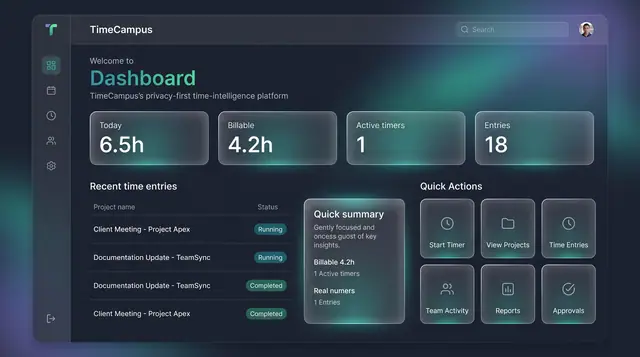
Home Dashboard and Custom Widgets
A home screen that sums up today's time at a glance, plus a widget board you assemble from the cards you care about.
2 illustrations
Part of industry solutions
This concept appears in cross-product solutions on burdenoff.com — see how it works alongside other Burdenoff products to solve a problem in that industry.

Industry solution
Education & EdTech
A structured focus timer with interval cycles and short and long breaks, on desktop and phone, so review happens in deliberate sessions rather than one all-night block.
See the solution(opens in a new tab)
Industry solution
Family & Home Life
A structured focus timer with interval cycles and breaks that gives the homework window a clear start, rhythm and finish, on a laptop or a phone.
See the solution(opens in a new tab)